Multi-store storage
Every new Docbank write lands in the vault's built-in filesystem store first. That fixed primary keeps ordinary ingest simple and gives every document a local verified copy before placement policy is considered. You can attach secondary filesystem or S3-compatible stores when a collection needs another physical location or the primary needs space.
Placement is capacity management, not synchronization or backup. Docbank records which verified stores may satisfy each retained SHA-256 identity, but it does not mirror arbitrary filesystem changes, manage bucket lifecycle rules, or replace a complete backup.
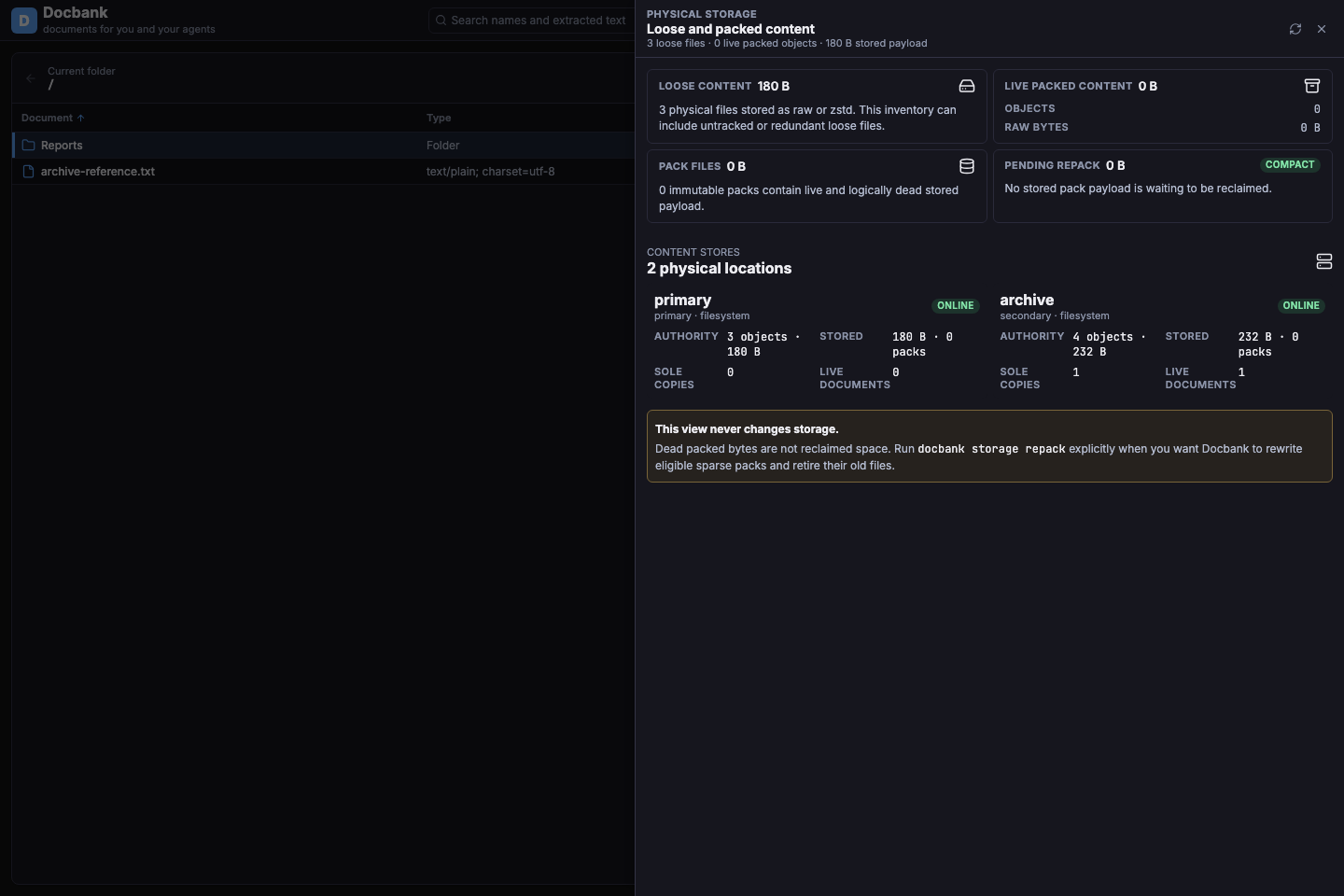
The web application and TUI expose this inventory read-only. Registration, placement, repair, takeover, evacuation, and removal remain explicit CLI or master-key API operations.
Configure a binding
Bindings are machine-local deployment configuration. Paths, endpoints, buckets, prefixes, and credentials never enter portable metadata, audit history, browser sessions, or backup placement manifests.
# $DOCBANK_HOME/config.toml
[store_bindings.archive]
kind = "filesystem"
path = "/Volumes/docbank-archive"
priority = 20

[store_bindings.cold]
kind = "s3"
endpoint = "https://objects.example.net"
region = "us-east-1"
bucket = "documents"
prefix = "docbank/cold"
credential_profile = "docbank"
priority = 40
force_path_style = true
S3 endpoints must use HTTPS, including services reached through loopback. Docbank has no production switch for plaintext S3 because a TCP port does not prove which local process received the ownership marker or document bytes. Use the service's authenticated TLS endpoint or an owner-confined, authenticated proxy.
Secondary stores contain readable document bytes
Docbank verifies secondary objects but does not encrypt them. Anyone with raw read access to a filesystem store or S3 prefix can decode the documents without the daemon API key. Restrict that access to the vault owner and use independently controlled filesystem, bucket, or KMS encryption when the storage operator is outside the intended trust boundary.
Restart the daemon after editing config.toml. Binding configuration is read
once at startup; a running daemon fails with storage_configuration_stale
rather than guessing about newly edited settings.
Attach and inspect a store
Registration is preview-first because it writes an ownership marker into the target namespace:
docbank storage add cold --binding cold
docbank storage add --run --token <preview-token>

docbank storage list
docbank storage status cold --refresh
The stable store UUID is authority. A canonical UUID selector is always
treated as an ID, never as a name. --refresh performs a fresh
ownership-marker check. Ordinary status
uses bounded daemon observations so it does not add a network request to every
read.
Use --takeover only when deliberately transferring an already marked
namespace from another vault instance. Takeover writes a fresh ownership epoch
and fences the former owner. It is not a way to share one prefix between two
live vaults.
Each active secondary must own a disjoint namespace. Filesystem paths may not overlap the vault, a watched inbox, or another active filesystem store. S3 stores may not use equal or nested prefixes under the same canonical endpoint and bucket. The ownership marker is the authoritative fence; path and prefix comparisons reject obvious aliases before Docbank contacts the backend.
storage list and storage status separate catalog authority from observed
availability. authoritative_objects counts verified locations recorded for a
store. unreadable_objects counts objects for which every authorized location
is currently offline, so two unavailable replicas do not misleadingly look
readable. Missing, corrupt, fenced, unavailable, and unbound states remain
distinct because their recovery actions differ.
Understand primary coverage
Two typed reports expose the counts used to diagnose primary coverage:
The authoritative_objects value for the store whose role is primary can
be compared with tracked_blobs from docbank info. A lower primary count is
a warning that content is held elsewhere. Matching counts are not an atomic
proof: the endpoints use separate live snapshots, and watches, ingests,
clients, or storage jobs can change placement before shutdown.
sole_authority_objects cannot establish coverage either because two
secondary replicas can make neither one a sole copy while the primary still
has no location. Use docbank backup create for a complete,
topology-independent recovery point; it verifies one authorized location for
every logical blob or fails without publishing a partial backup.
Place retained content
Preview a copy while keeping the primary:
docbank storage place /archive/closed-projects --to cold
docbank storage place --run --token <preview-token>
Add --move to request source retirement after the destination is published,
read back, and SHA-256 verified:
The preview reports logical bytes, bytes requiring transfer, verification read-back, remote egress, local scratch, shared-reference constraints, audit-pinned bytes, and immutable-pack bytes that need a later repack. The run revalidates every object before its short catalog commit; concurrent document changes can safely reduce reclamation without invalidating the verified copy.
Audited content stays on the primary by default. Remote-only audited retention
requires --allow-audited-remote-only in the preview. That acknowledgement
means Docbank will never authorize deletion, but it cannot prevent deletion by
bucket lifecycle rules, storage administrators, or lost credentials.
Offline, damaged, and fenced stores
Reads try catalog-authorized candidates in stable priority order. An unavailable redundant store does not block a healthy copy. Missing and corrupt locations are reported distinctly and are immediately demoted for the current daemon run; durable catalog authority changes only through an explicit repair.
Repair republishes verified bytes from another readable location. For a store whose ownership marker has been taken over, salvage is an explicit read-only recovery into the primary:
Salvage never restores ordinary authority to the fenced store. Every operation
has a durable ID; inspect interrupted or uncertain work with docbank jobs
and docbank jobs show <operation-id>.
Physical deletion happens after catalog authority has moved. If that cleanup temporarily fails, the operation returns to the durable queue with the failure visible and the daemon retries it; it is never left looking actively running after its worker has stopped. The already verified destination remains authoritative while retry proceeds.
Evacuate and remove
docbank storage evacuate cold
docbank storage evacuate --run --token <preview-token>
docbank storage detach cold
docbank storage unregister cold
Evacuation copies every source-only object into the fixed primary, verifies the destination, then revokes the secondary catalog locations. Immutable pack containers may retain dead physical bytes until repack. Detach preserves the empty store identity while removing it from runtime use; unregister is the separate final action and is accepted only for an empty detached store.
Backup and restore
Every successful backup remains complete even when the live vault is remote-only: it reads and verifies one candidate for every logical blob. A sole unavailable location makes the snapshot fail rather than publish a partial recovery point.
The snapshot carries a deterministic docbank-placement-v1 artifact with
source store IDs, display names, backend kinds, roles, per-hash source store
IDs, and aggregate counts. It contains no deployment path, endpoint, bucket,
prefix, credential profile, ownership epoch, encoding, or pack coordinate.
Default restore ignores source topology and rebuilds a fresh local primary. To reconstruct selected placement, provide an owner-private mapping file:
version = 1

[[stores]]
source_id = "4d9c1a61-f8c4-4c17-99f4-b30dd2f7d8a2"
name = "restored archive"
binding = "cold"
takeover = false
remote_only = false
allow_audited_remote_only = false
docbank backup restore --target ~/Restores/docbank \
  --store-map ~/.config/docbank/restore-stores.toml
On Unix the mapping file must be owned by the current user and mode 0600 or
stricter. Windows requires an owner-restricted DACL. Docbank refuses a final
symlink/reparse point and validates the complete map before contacting a
backend. Target stores receive fresh IDs and epochs. Existing identical
objects may be adopted only after full read-back verification.
Mapped filesystem namespaces must also be disjoint from the running source
vault and the backup repository. Before the restored vault is published,
Docbank writes a minimal owner-private config.toml containing the selected
target bindings. If the target already has a configuration file, Docbank
requires those bindings to match and never rewrites it. A remote_only
restore therefore cannot retire the restored primary and then reopen with its
only authoritative stores unbound.