Web application
Run:
Docbank starts or reconnects to the selected vault's compatible daemon and opens its local web application. Choose local files for verified upload, navigate the virtual tree, sort a folder by document name, size, or modification time, search names and extracted text, and inspect the selected document's stable node ID, revision, current version ID, SHA-256 identity, exact size, and media type. A selected live file or folder can be moved to recoverable trash after an explicit confirmation; the trash drawer lists restorable roots and returns one to the live tree under its inspected revision. The authority card also shows every tag assigned to the selected file or folder and can add or remove an existing definition under the node's inspected revision. The toolbar's tag catalog also creates, renames, and deliberately deletes stable definitions. Selecting a tag browses its live assignments, while search can require the same exact tag identity. Protected documents expose their newest-first permanent audit timeline and complete event authority. The audit-verification button independently replays permanent history, hashes every protected blob, and exposes the current allocation and scope-chain evidence. The storage button separates loose content, live packed content, pack-file payload, and logically dead packed bytes awaiting repack. The activity button reports the daemon's supervised extraction, watched-inbox, and automatic-packing jobs. The backup button lists immutable recovery points in the configured repository without running backup or restore work. Every file also exposes its retained immutable content versions and the stable authority behind each one, plus the immutable provenance Docbank recorded when the document entered the vault.
The browser is another client of the authenticated HTTP API. It does not open SQLite or the blob store, and it has no private route that the CLI or an agent cannot use. The daemon remains loopback-only.
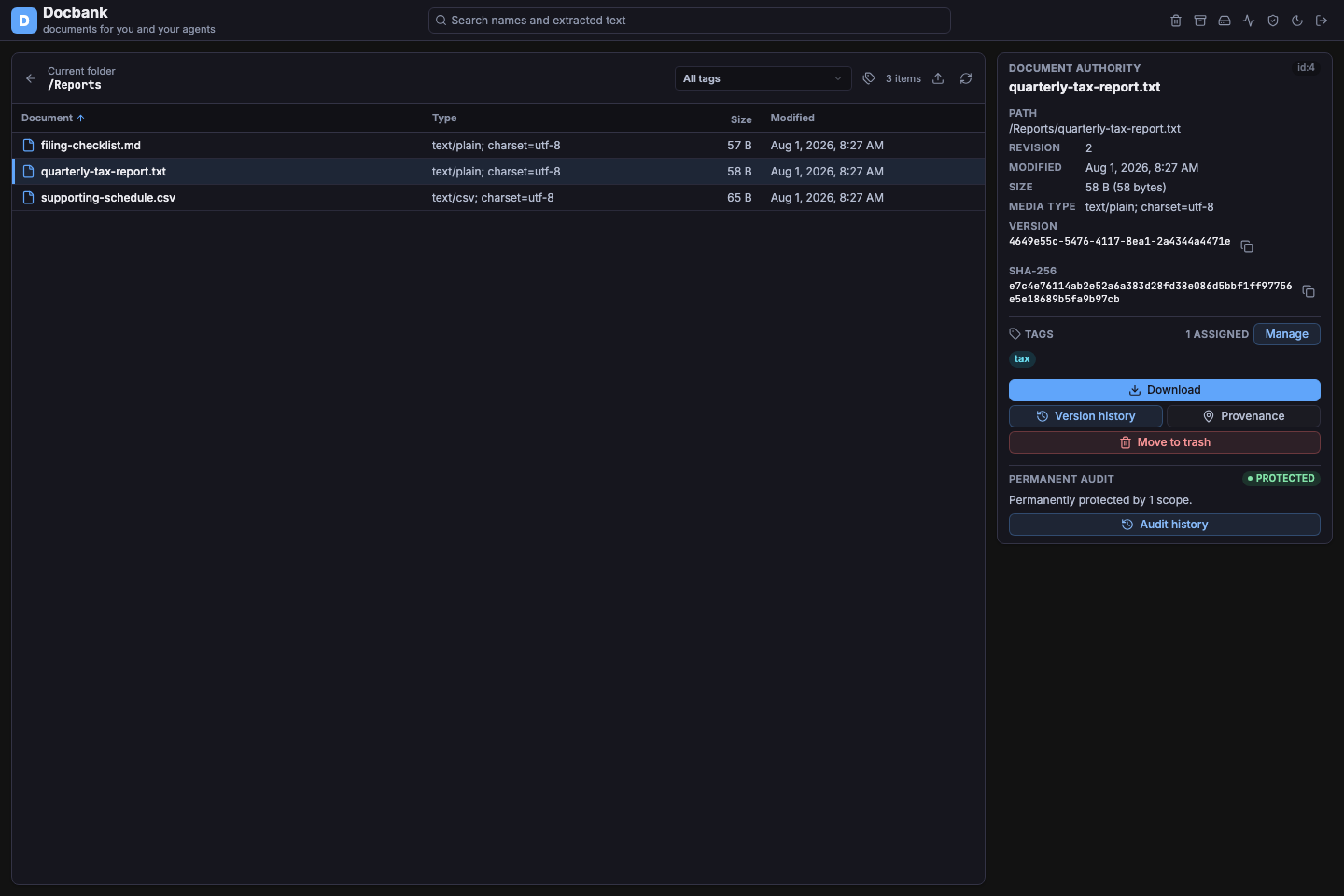
The root browser keeps the document table primary while the authority card shows the selected file's stable identity and verified content hash.
Browse the vault
- Click a row once to inspect it. The authority card updates without opening or downloading the file.
- Double-click a folder, select it and press Enter, or use Open folder in the authority card to navigate into it.
- Use the back arrow to restore the previous folder or search view, including its selection and sort order.
- Click Document, Size, or Modified to sort. Click the active heading again to reverse its direction. Directories remain grouped ahead of files in folder views.
- Use refresh to reload the current stable directory ID. If another client renamed or moved that directory, the browser adopts its current canonical path.
The browser selects the first row after loading a folder. A selected directory shows its path, revision, and modification time. A selected file additionally shows its exact logical size, media type, immutable current-version UUID, and SHA-256 content identity. The copy buttons copy the complete UUID or digest even when the card wraps it across lines. Every selected node also shows its assigned tag names. Hovering a tag shows its stable UUID and vault-wide assignment count; the bounded tag stack expands in place when a node carries more than six.
Assign and remove tags
Choose Manage beside the selected node's tag list. The dialog separates the definitions already assigned from the first 1,000 name-sorted definitions available in the vault. Choose one existing tag and Add tag, or remove an assigned definition individually.
Every change is bound to the stable node ID and revision shown in the dialog. A successful receipt advances the document authority, updates the tag's vault-wide assignment count, and refreshes the catalog and permanent-audit status. If another person, agent, or CLI command changed the node first, the dialog keeps the failed decision visible and asks you to refresh rather than applying it to newer state.
Manage tag definitions
Choose the tag-catalog button beside the toolbar selector to create, rename, or delete the vault's shared tag definitions. Creating allocates a new stable UUID. Renaming keeps that identity while advancing the definition revision and every assigned node's metadata authority. A stale rename remains visible instead of overwriting a definition changed by another person or agent.
Deleting requires a separate confirmation that names the exact stable ID, revision, and current assignment count. It removes the definition and all of its assignments, but never deletes a document or its stored content. Reusing the same name later creates a different stable identity. After a rename or deletion, the browser reloads the active folder, search, or tag view so node revisions and assignment counts remain authoritative.
The catalog shows the first 1,000 name-sorted definitions and discloses the
complete count. Use docbank tag, the paginated HTTP API, or an embedded client
for exhaustive definition management and bulk assignment.
Move a node to recoverable trash
Choose Move to trash on the selected live file or folder. Docbank opens a confirmation that names the complete virtual path, stable node ID, and revision being acted upon. A folder and its live descendants move to trash together.
The daemon applies the mutation only if that exact node revision is still current. If another person, agent, or CLI command changed the node first, the browser keeps the confirmation open and asks you to refresh instead of silently acting on stale authority. A successful receipt removes the selection and refreshes the current folder, search, or tag view.
This action is deliberately recoverable. It does not empty trash, garbage collect content, reclaim packed space, or erase permanent audited history.
Restore from recoverable trash
Choose the trash button in the top bar to inspect the newest 1,000 independently restorable roots. Each entry shows its name, kind, stable node ID, revision, trash time, and logical size for files. A folder entry represents the complete subtree that left the live tree in that trash operation.
Choose Restore and confirm the inspected revision. Docbank returns the same stable node and retained content to its original live parent when that directory still exists. If the parent is unavailable, restore falls back to the vault root; if the chosen name is already occupied, Docbank adds its normal collision suffix. The completed receipt shows the actual canonical path rather than predicting where the item should have landed.
A stale revision leaves the confirmation open so the operator can refresh and make a new decision. A successful restore removes the item from the trash drawer and reacquires the live tree from root, discarding cached paths whose parent revisions may have changed.
The browser cannot empty trash. Permanent tree-metadata deletion, subsequent garbage collection, and packed-space reclamation remain explicit CLI or master-authenticated API operations.
Upload verified documents
Choose the upload button while browsing a live folder, then select one or more files from this device. Upload is deliberately unavailable from search and tag-wide result views so the destination is never ambiguous. The drawer names the destination's stable directory ID and current canonical path.
Docbank makes two bounded-memory passes over each selected file. The first pass computes the browser's declared SHA-256 while showing hashing progress. The second streams the bytes with visible progress over a dedicated upload channel. Before the upload button becomes available, the daemon proves that channel with a random secret issued through the ownership-pinned CLI handoff. File bytes never use an ordinary reconnectable browser HTTP request.
The channel is bound to one browser session and one daemon lifetime. If it
breaks, the page permanently disables upload rather than reconnecting to
whatever process now owns the loopback port; run docbank web again to obtain
a newly proved channel. The daemon independently computes the hash and size
and grants node/blob authority only when both match. The browser compares that
receipt again before reporting Added or Already present, then refreshes
the destination by stable ID.
Files are independent queue entries: one rejection does not make another success ambiguous, and failed entries can be retried. Cancellation can race with a daemon commit whose receipt did not reach the browser, so the drawer labels that item Unconfirmed, refreshes the destination, and directs the operator to retry; the idempotent upload contract then converges on the stored result. Name/content collisions retain the ordinary ingest suffix behavior rather than overwriting a document. Selecting a local file never changes or removes the source.
This first browser import is file-granular. Folder recursion, server-filesystem ingest, watched-inbox configuration, and replacing an existing document remain CLI or authenticated API workflows.
Download verified content
Choose Download on a file to retrieve its current version. Docbank first copies the object from loose or packed storage into owner-private daemon staging while the browser shows verified byte progress. The selected node revision, version UUID, SHA-256 identity, and exact size must still agree before that work starts. A concurrent replacement, move, or trash operation therefore asks you to refresh instead of silently downloading a different document.
Only terminally verified bytes receive a short-lived, one-use browser download ticket. The native browser save begins after that proof succeeds; cancellation or a verification failure removes the private staging file and publishes nothing to the browser. The ticket identifies only that prepared file, expires after two minutes, and cannot call any other Docbank route. It is not the vault API key or the browser session.
Preparation streams on the daemon and does not buffer the object in browser
memory. It temporarily needs local free space equal to the document's logical
size. Docbank reports that verified bytes were handed to the browser, not that
the browser or operating system completed its final save. Use docbank get
when automation needs a durable receipt after private staging, file sync,
atomic publication, and parent-directory sync.
Inspect immutable versions
Choose Version history on any file to inspect every retained immutable version without losing the current folder, search results, or selected document. The newest version appears first. Each entry identifies whether the content was created, replaced, or restored from a prior version, along with its recorded time, node revision, logical size, and stable version UUID.
Selecting an entry exposes its complete authority: full version UUID, SHA-256 content identity, exact byte count, media type, canonical timestamp, introducing operation UUID, and the source version for a revert. The current head is marked explicitly; a revert remains a new immutable version rather than erasing or relabeling the earlier one.
Choose Download in the complete-version panel to retrieve that exact retained version through the same private staging, progress, terminal verification, and one-use handoff as the current-content action. The stable version UUID, owning node, SHA-256 identity, size, and current node revision must all agree before preparation begins. Historical versions do not retain a filename timeline, so the browser uses the live document's current name. Version comparison remains a CLI or authenticated API workflow.
The drawer reads at most the newest 1,000 versions and says when older history
exists. Use docbank versions list, its pagination flags, or the authenticated
HTTP API for exhaustive automation. This view does not compare bytes, revert,
or prune history.
Understand where a document came from
Choose Provenance on any file to inspect the origin facts Docbank retained when it ingested that document. The newest ingest appears first. Each entry shows its source kind and description, original reference, ingest time, and whether it is the active origin or has been superseded by a corrected fact.
Selecting an entry exposes its complete stable provenance identity, ingest UUID, node ID, canonical ingest timestamp, original modification time when one was supplied, and supersession link. The drawer adopts the node state returned with the provenance page, so a concurrent move displays the current canonical path and a trashed document is labeled explicitly rather than retaining an obsolete path from the table.
An original reference is evidence, not a live filesystem promise. It may be a portable relative path from a watched inbox, a local path recorded by an ordinary ingest, or an opaque reference supplied by an embedded application. The browser does not open, validate, change, or retain that external source.
The drawer reads at most the newest 1,000 facts and says when older provenance
exists. Use docbank provenance, its pagination flags, or the authenticated
HTTP API for exhaustive automation. Provenance correction and external-content
pinning are not browser workflows.
Browse tags and search text
Enter a word or phrase in the search box and press Enter. Results can match a live document name or verified extracted text. The Match column identifies which one. Name matches retain their API relevance ranking and appear before content-only matches until you choose an explicit column sort.
Use the tag selector in the browser toolbar without a text query to browse
up to 1,000 live items carrying one exact assignment. The bounded result is
read in one metadata snapshot, so its node state and complete virtual paths
cannot mix concurrent moves, trash operations, or content updates across
pages. Trashed assignments are omitted from this live view and disclosed in
its count; docbank tag nodes remains the exhaustive paginated
live-and-trashed workflow.
With text in the search box, the same selector requires that tag in addition to the name or content match. Tag names are displayed for people, while both workflows are bound to the tag's stable UUID so a later rename does not silently change which definition was selected. Changing the selector reruns the current browse or search.
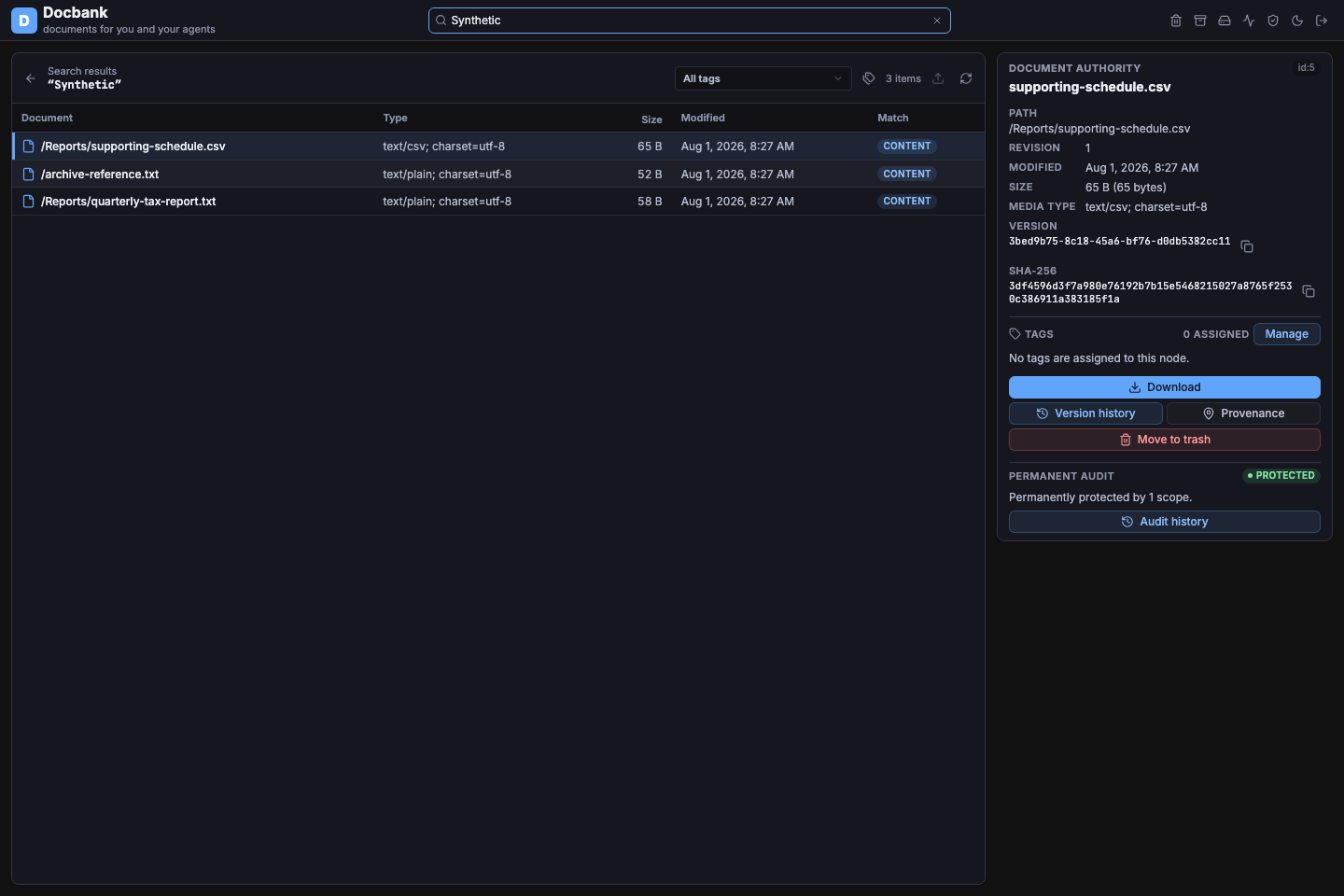
Search results display complete virtual paths and keep the same authority inspection available from ordinary folder browsing.
Clear the search box to return to the selected tag's assignment view, or to
the current directory when All tags is selected. The selector loads at most
the first 1,000 name-sorted tag definitions and discloses when more exist. Use
docbank search when you need an exhaustive tag catalog, directory, media-type,
or modification-time filters, structured JSON, or another result limit.
Read permanent audited history
The authority card checks the selected node's stable audit membership. A green Protected badge means ordinary deletion, version pruning, garbage collection, and repacking cannot erase that node's retained history. Not audited means audit authority exists in the vault but the selected node is outside every permanent scope. Dormant means no scope has been enabled.
Choose Audit history on a protected node to open a wide timeline without losing the current folder, search results, or selection. The timeline is newest first and explains the primary change for each event: live and retained-trash paths, content-version transitions, tag definitions and assignments, or provenance. Select an event to inspect its complete immutable event, operation, scope, and node identities; canonical timestamp and origin; before/after revision, path, and version state; and typed tag or provenance payload.
The first page is bounded to 50 events. Load older events follows the API's append-stable cursor, so new activity cannot shift or duplicate the history already being inspected. Protection status remains authoritative even when a page contains no events. The web application does not infer protection from an empty or non-empty timeline.
Verify permanent audit evidence
Choose the shield-check button in the top bar to run the vault-wide permanent audit verifier. This is more than reading stored status: Docbank independently replays canonical audit history against the current node, version, membership, topology, tag, and provenance projections, then reads and recomputes SHA-256 for every unique blob retained by protected history.
A successful result reports the protected and verified blob totals, unique raw bytes, vault and allocation-lineage identities, operation high-water mark, allocation entry count and head, and each scope's terminal entry count and chain head. Copy buttons preserve the complete identities even when they wrap. A dormant vault is reported separately from a failed verification; metadata, missing-content, corruption, and unreadable-content problems remain visible with the affected hash.
This drawer runs only a fresh proof of current authority. It does not accept a
previous evidence bundle, enroll a scope, or change protected state. Record
docbank audit verify --json outside the vault and later use
docbank audit verify --expected when that external copy must act as a rollback
trust anchor. Closing the drawer cancels its active request; maintenance
contention or interruption remains visible and can be retried deliberately.
Inspect background work
Choose the activity button in the top bar to inspect the jobs owned by the current daemon. Each entry identifies the stable job name, whether it is running, completed, failed, or cancelled, and its start and finish time. Terminal failures include the daemon's bounded error text so an operator can distinguish an idle system from a watcher, extractor, or automatic packer that stopped.
Use refresh to request a new snapshot. The drawer does not start, stop, retry, or reconfigure work; use the relevant configuration, CLI, or authenticated API workflow after understanding the failure. Job records belong to one daemon lifetime and disappear when that daemon restarts.
Inspect physical storage
Choose the storage button in the top bar to see how the current vault occupies managed blob storage. The summary separates four related quantities:
- Loose content is the physical inventory of individual raw or zstd files. It can include untracked files or redundant loose copies of packed objects, so it is not an authority count.
- Live packed content is authoritative content stored in immutable pack files. The view shows both its logical raw size and its stored size.
- Pack files is the complete stored payload of every pack, including live and logically dead entries.
- Pending repack is logically dead payload that still occupies those immutable pack files.
Below the aggregate cards, Content stores lists each fixed primary or configured secondary with its filesystem/S3 kind, observed online, unavailable, fenced, or unbound state, catalog-authorized objects, logical and stored bytes, pack count, sole copies, and affected live documents. When an unhealthy store is the only authority for an object, the drawer says how many objects currently have no readable alternative. It never exposes binding paths, endpoints, buckets, credential profiles, or ownership epochs.
Pending-repack bytes have not been reclaimed. This distinction matters when a GC report has removed unreachable catalog mappings but the vault's disk usage has not fallen by the same amount. The percentage beside the pending total shows how much of the current pack payload is dead, not a compression ratio or a promise that every pack is immediately eligible for compaction.
This drawer is read-only and refreshes from the daemon's current catalog
authority. It cannot pack, garbage-collect, or repack content. Use
docbank storage status for structured or scripted inspection, see
Multi-store Storage for repair and placement, and run
docbank storage repack explicitly when you intend to rewrite eligible sparse
packs and retire their old files.
Inspect backup snapshots
Choose the backup button in the top bar to inspect the immutable recovery
points in the repository selected by [backup] repo in config.toml. The
repository path and stable repository ID make the authority being inspected
explicit. Snapshots appear newest first with their tag, immutable ID, creation
time, full or incremental relationship, logical node/file/blob counts, logical
content bytes, and the pack bytes newly added by that capture.
An initialized repository with no snapshots is different from an unconfigured repository, and the browser reports those states separately. The browser does not accept an arbitrary server path, initialize a repository, create a snapshot, verify content, restore a vault, or delete retention history.
Seeing a manifest in this list is not proof that its referenced bytes are
still readable. Run docbank backup verify to independently prove repository
integrity, and periodically restore into a separate vault to rehearse the
complete recovery path.
Browser authentication
When Docbank opens the browser, it writes a small launch page beside the owner-private daemon runtime record and passes only that credential-free local file path to the operating system. Before doing so, the ownership-pinned CLI asks the daemon to exchange its master API authority for a random, daemon-lifetime browser session. The master key stays on that pinned connection and never enters browser storage, a URL, or a child-process argument.
The daemon serves that session from a second listener with a cryptographically
random .localhost hostname and a newly selected loopback port. This browser
origin is independent of the configured API port and unique to one daemon
lifetime. A process that later captures either port therefore cannot leave a
service worker or cached script waiting for a future browser session.
The launch page carries the scoped session and its random upload-proof secret
in a URL fragment. Browsers do not include fragments in the initial HTTP
request; the application removes them from the address bar and holds them only
in page memory. Ordinary requests use
X-Docbank-Web-Session, which the daemon accepts only for the tree, node,
search, tag-definition and assignment reads, immutable-version, provenance,
audit-status, audit-history, vault-wide audit verification, background-job,
physical-storage-status, configured backup-snapshot-list, bounded trash-list,
verified-download preparation, revision-bound move-to-trash and restore, tag
assignment/removal, and tag-definition create/rename/delete requests used by
this interface.
Download preparation may write only owner-private temporary bytes and issue
one exact, expiring file ticket. Upload uses a separate, never-reconnecting
WebSocket authenticated by a challenge proof over the upload secret. No file
bytes are sent until that proof succeeds. It may create only file nodes
beneath the stable live directory selected in the browser and must satisfy the
same caller-declared/server-computed byte identity as every remote writer. The
trash and restore requests can target only the stable selected node and must
carry its current revision, so a stale browser view cannot move changed state.
Tag assignment and removal have the same stable-node revision boundary.
Renaming and deleting definitions require their inspected tag revision, and
definition deletion explicitly reports how many assignments were removed.
These permissions do not grant bulk tag mutation. The session
cannot empty trash, perform any other document mutation,
enroll audit scopes, run general metadata/content or backup verification, or
call backup creation, restore, maintenance, configuration, or general API
endpoints.
Its sole backup capability is listing the immutable snapshots in the
repository already configured for this daemon.
The lock button revokes the session in daemon memory and clears the page.
Every remaining browser session and its dedicated browser origin disappear
when that daemon stops. Run docbank web again to create a fresh origin and
session against the ownership-proven daemon.
Closing the browser tab does not stop the daemon or revoke other sessions.
Use the lock button when the current tab should lose access immediately, and
use docbank daemon stop when every session and the daemon itself should end.
The launch file remains beneath $DOCBANK_HOME/web-launch/ with the same
owner-only Unix permissions or Windows DACL as the runtime record. It is
runtime state, excluded from snapshots, replaced by the next launch, and
removed when the daemon stops.
Use docbank web --no-browser only when another local program must open the
URL. That output contains the live browser credentials. Do not put it in shell
history, logs, screenshots, issue trackers, or chat.
Current boundary
Folder, tag, search, and recoverable-trash views are bounded to 1,000 rows and say when more
results exist; use the CLI or paginated HTTP API for exhaustive automation. Search has
the same name and verified extracted-text semantics as docbank search.
Results initially preserve the API's relevance ranking. Choosing Document,
Size, or Modified changes to that explicit column order; Document compares the
complete paths shown in search results rather than only their basenames.
Refreshing a folder resolves its stable node ID, current canonical path, and
children in one metadata snapshot, so a concurrent CLI or agent move cannot
leave the browser constructing child paths beneath an obsolete name.
The current web application does not compare versions, recursively import folders, edit, revert, prune, move live nodes between folders, bulk-apply tags, empty trash, enroll audit scopes, or run maintenance, backup creation, backup verification, general metadata/content verification, or restore operations. Use the corresponding CLI or authenticated HTTP endpoint for those workflows. Future web workflows will require deliberately expanded browser-session permissions rather than inheriting the master API key.
If a page reports that its browser session or upload channel expired, ended,
or was rejected, run docbank web again. Neither credential nor the upload
channel survives daemon restart, and the previous random .localhost origin
is not reused.