Interactive terminal browser
Run:
The TUI uses the same authenticated daemon API as the ordinary CLI. It never opens SQLite or the blob store and cannot bypass the vault's exclusive owner. Starting it reuses or starts the daemon in the normal way. A TUI session may outlive the background daemon's idle window, so each bounded interaction rediscovers or restarts a compatible daemon before issuing its request; leaving the terminal open does not pin an otherwise idle process.
The main view is a full-width document table. At ordinary terminal widths it shows each document's name, type, size, and UTC modification time; search results also identify the match kind when space permits. Narrow terminals progressively hide secondary columns so the document name remains useful.
Press i to leave the table temporarily and inspect the selected document's complete stable node selector, path, revision, modification time, and—when it is a file—its immutable version, SHA-256 identity, exact size, and media type. The same authority view lists every assigned tag name with its stable UUID, so renames remain distinguishable from identity. Long authority values wrap rather than truncate.
Press a on any selected node to open its permanent audited history. The timeline is newest first and shows when each event was recorded, what happened, and the primary path, version, or attached-metadata change. Press Enter to inspect the complete immutable event ID, operation and scope IDs, revisions, path states, version identities, and typed tag or provenance details. Nodes outside an audit scope are identified plainly rather than shown with an empty or invented timeline.
Press J to inspect daemon-owned background work without leaving the document view. The activity screen shows each stable job name, whether it is running, completed, failed, or cancelled, and its start and finish times. Inspecting a job exposes its complete terminal failure text. Refresh asks the current compatible daemon for a new snapshot; closing the screen returns to the same document selection. The current daemon contract reports lifecycle rather than invented percentages: workers will show numeric progress only when they can supply an authoritative completed and total count.
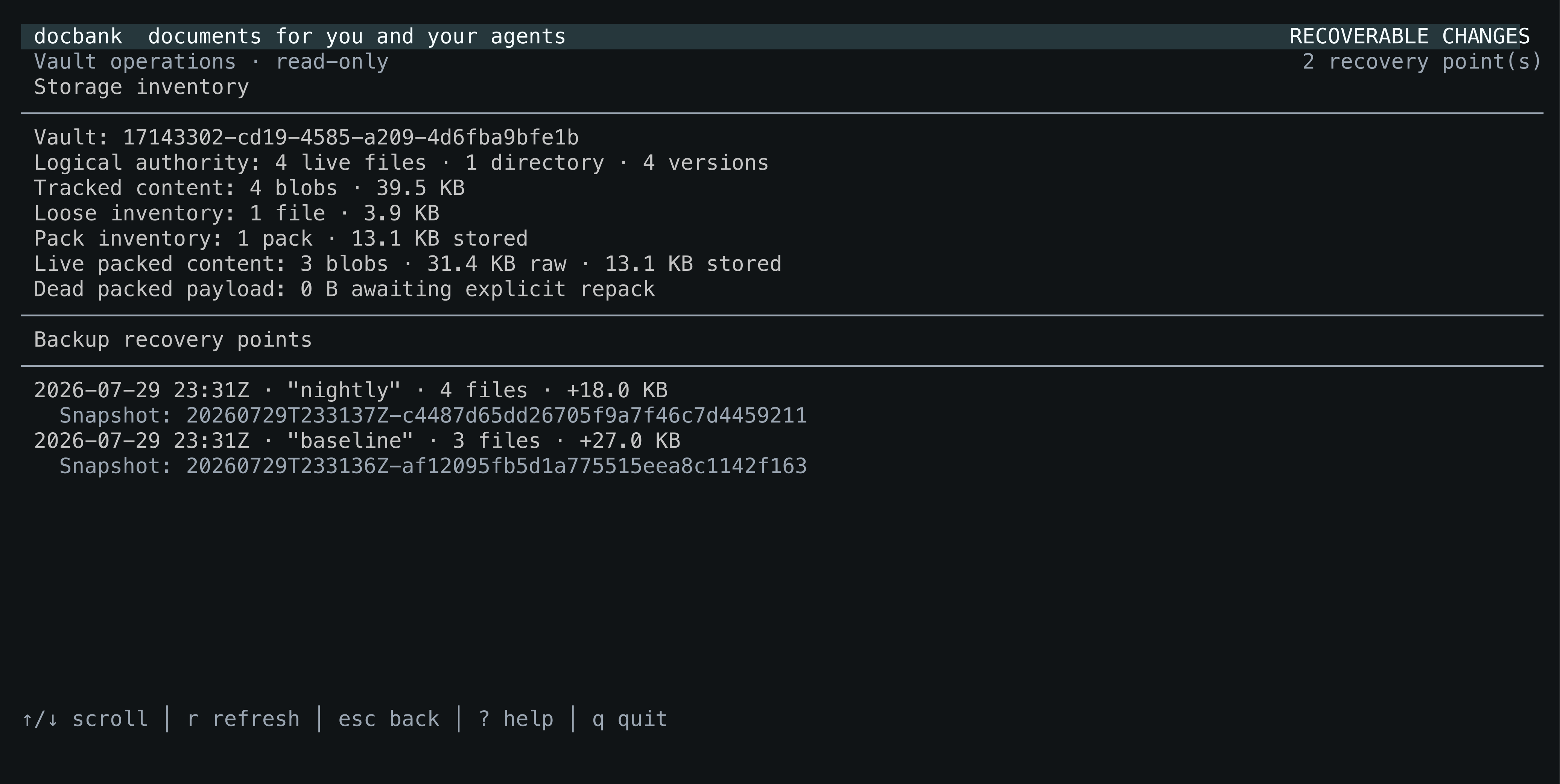
Press O for a read-only operational summary. It separates logical catalog authority from physical loose-file and pack inventory, including live packed content and dead packed payload awaiting an explicit repack. The same screen lists the configured backup repository's recovery points with their creation time, tag, snapshot ID, file count, and newly added bytes. Storage status remains useful when no backup repository is configured; the two independent results report their own errors.
Press x to review moving the selected live node to recoverable trash. The confirmation names the escaped path, stable node ID, and exact revision that will be changed; a concurrent change is rejected rather than silently targeting newer state. The dialog also says plainly that the node remains restorable and no content bytes are reclaimed.
Press T to browse independently restorable trash roots, newest first. Enter opens a second revision-bound confirmation. A successful restore reports the actual live path selected by the daemon after collision suffixing or origin-parent fallback. Restoration does not guess or promise the old path. Permanent deletion and physical reclamation are deliberately absent from the TUI; use the preview-first CLI or authenticated HTTP workflows when that is really intended.
| Key | Action |
|---|---|
| ↑/k, ↓/j | Move between documents |
| Enter or → | Open the selected directory |
| Enter on a file, or i | Inspect complete document authority |
| x | Review moving the selected revision to recoverable trash |
| T | Browse and restore recoverable trash roots |
| a | Browse the selected node's permanent audited history |
| J | Inspect daemon background jobs and failures |
| O | Inspect storage inventory and backup recovery points |
| ←, Backspace, or Esc | Return to the parent directory or leave search results |
| / | Search live names and extracted text |
| s | Cycle the sort column: name, size, and modification time |
| v | Reverse the current sort direction |
| r | Refresh the current directory or search |
| ? | Show keyboard help |
| q or Ctrl-C | Quit |
Within audited history, n/→ loads the next older page and p/← returns to a cached newer page. Escape returns to the same directory or search result and selected document. Each page is bounded to 100 events; the heading reports its position in the complete history.
Search has the same semantics as docbank search: name matches precede
content-only matches, and content is available only for supported documents
whose current bytes completed verified extraction. Results say whether the
match came from the name or content. Relevance order remains the search default;
pressing s opts into a column sort, and cycling through the columns
returns to relevance. The first interface loads at most 1,000
directory entries or search hits and says when more exist; use the CLI or HTTP
pagination for exhaustive automation.
Other mutations, permanent deletion, permanent-audit enrollment, independent verification, backup creation/verification/restore, and storage maintenance remain outside this interface. Use their ordinary CLI commands or authenticated HTTP endpoints.
The O operations screen keeps storage and backup loading independent. Its storage section lists every physical store's role, backend kind, observed health, authoritative object count, logical and stored bytes, affected live documents, and any sole-authority objects without a readable alternative. It is read-only and does not expose binding paths, endpoints, credentials, ownership epochs, takeover, repair, or placement controls.