Permanent audited history
Enable permanent audit for a directory when you must retain its versions and
recorded changes indefinitely. The selected directory and its protected
members form an audit scope. Enabling a scope is irreversible: Docbank has no
audit disable command.
Once you enable it:
- Docbank protects every node and retained content version in the reviewed scope.
- New children inherit protection.
- Moving or trashing a protected node does not remove protection.
- Docbank appends supported content, tree, provenance, and tag changes to a history designed to expose tampering.
- Ordinary version pruning and permanent trash deletion cannot erase protected records or versions.
An unaudited file also keeps all versions by default, but you can release old
versions with versions prune. An audited version permanently keeps its
content reachable, so garbage collection cannot remove that content.
First enrollment retains metadata from the whole vault
The first scope also permanently retains a snapshot of vault-wide metadata: node names and folder structure, tags, assignments, ingests, and provenance. This includes records outside the chosen directory. Those other documents do not become scope members, and their content versions are not protected, but their enrollment-time metadata remains in the audit evidence.
See Audited history for the evidence format and Integrity and trust for verification limits.
Review before enabling
First preview the scope. This command does not change the vault:
It reports:
- the stable target node and proposed scope identities;
- directories, files, and existing versions that will become protected;
- logical and unique blob bytes retained by those versions;
- unresolved retained trash origins, if any;
- the vault-wide topology and attached metadata, including records outside the selected scope, that will be permanently retained as audit evidence;
- the baseline digest and exact projected JSONL audit growth; and
- a one-use token with a ten-minute expiration.
The vault-wide evidence counts matter even when /taxes is a small subtree.
The vault-wide allocation history records the surrounding folder structure
and metadata needed to check identities and detect a rollback. It does not
enroll unrelated documents, but its initial metadata snapshot is permanent.
Read the preview before executing the command it prints:
The daemon recomputes the complete enrollment while holding the mutation gate.
If any document, path, version, tag, provenance fact, or allocator state changed
after preview, execution returns audit_preview_stale and changes nothing.
Preview again rather than retrying the old token. Tokens are consumed by one
execution attempt and disappear when the daemon restarts.
For automation, add --json. A caller may preview by stable directory
selector instead of path (the older --node-id form remains available):
Inspect protection
Vault-wide status identifies the audit history, selected directories, and protected member counts. It also reports each scope's baseline (the snapshot recorded at enrollment) and chain head (the hash of its latest history entry):
Supply a live path or stable node ID to check whether a document is protected:
An empty timeline is not proof that a node is protected. Use audit status and
require protected: true plus its scope and baseline identities.
Read a node's history
Read the recorded changes for one protected document or directory by its live path:
Use a stable node ID when a document has moved, or while it is in trash:
Events appear newest first. Each event records its event ID, operation ID, scope, time, origin, and node revisions before and after the change. Other fields depend on the event:
- Path events record old and new paths and their
liveortrashstate. - Trash paths use
@trash/known/...or@trash/unknown/..., separate from live vault paths. - Content events record prior and resulting version IDs.
- Tag and provenance events record the attached metadata's stable ID and complete before-and-after state.
Human output summarizes these changes. JSON returns all event fields with their defined types.
The default page contains at most 50 events. Continue an older timeline with
the opaque cursor printed by human output or returned as next_cursor in JSON:
The cursor is bound to the stable node and does not shift when newer events are
recorded. Do not parse or construct it. A cursor from another node returns
invalid_audit_cursor, and a node outside every audit scope returns
audit_not_enrolled.
A protected node adopted during first enrollment may have no node-specific
events until its first later change. That empty timeline does not weaken its
baseline protection. Use audit status to check membership.
Read a scope's history
Use the stable scope ID from audit status to read recorded changes across
all protected members:
docbank audit history --scope <scope-id>
docbank audit history --scope <scope-id> --limit 100 --json
Scope history shows changes to all members without a separate request for each
document. Each event includes its stable node ID, which human output prints as
a copyable id:N selector. The response also includes the scope target,
baseline, member count, entry count, and current chain head. These identify the
scope and history being read.
Pagination uses the same newest-first ordering as node history. A scope cursor
is opaque, bound to that scope ID, and remains stable when later events are
appended. Reusing it with another scope returns invalid_audit_cursor.
Verify the permanent evidence
Use audit verify to check permanent history and protected content. Save its
JSON report outside the vault when you need a reference for later checks:
docbank audit verify
docbank audit verify --json
docbank audit verify --json > audit-evidence.json
docbank audit verify --expected audit-evidence.json
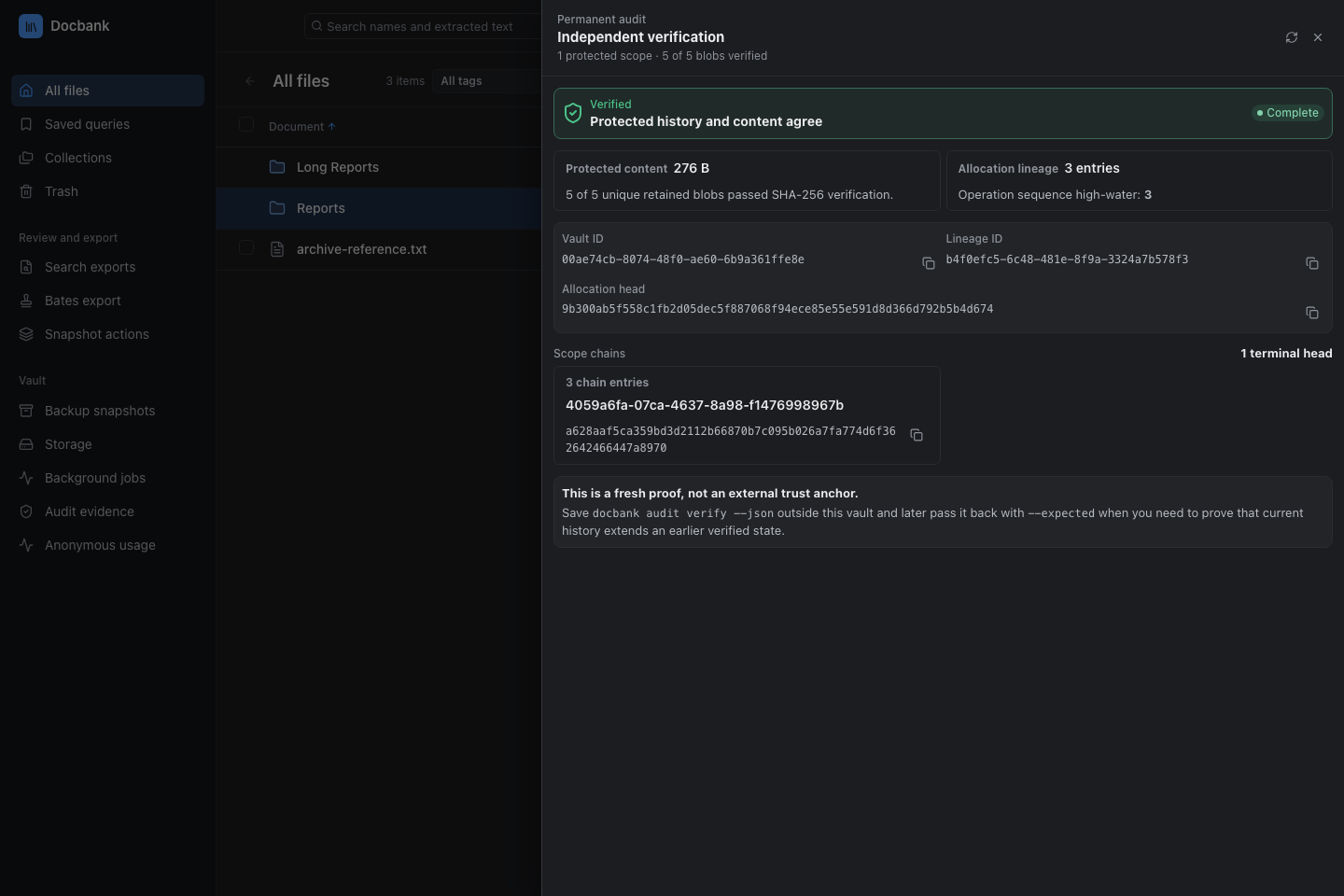
The verifier replays recorded history and compares the result with current nodes, versions, memberships, folder structure, tags, and provenance. It then reads each unique blob retained by protected history and recomputes its SHA-256 hash. Missing, corrupt, or unreadable protected content makes the command fail.
The successful JSON report includes an evidence object containing:
- Stable vault and allocation-lineage IDs, which identify this vault and its allocation history.
- The allocation entry count and latest entry hash.
- The operation high-water mark, which records how far operations have advanced.
- Each scope's entry count and latest entry hash.
When you supply this report with --expected, verification checks that the
recorded history remains intact within the current history. The vault and
allocation-lineage IDs must match. Each saved allocation or scope head must
still exist at its recorded entry count.
Unchanged chains pass, as do chains with valid later operations. A missing, shorter, or divergent chain fails with a structured evidence problem. The report still includes current metadata and protected-content results.
--expected reads a successful active audit verify --json report, not an
unverified hand-written head. Keep that report outside the vault and retain the
corresponding verified backups. The proof cannot detect an attacker who can
replace both the vault and your separately recorded evidence. The external copy
is the trust anchor.
docbank audit verify hashes protected content only. docbank verify is the
broader whole-vault check. It performs the same metadata and audit replay, then
hashes every cataloged blob, including content outside audit membership.
What remains usable
Protected documents remain working documents. Docbank records direct creation and filesystem ingest, verified content replacement and reversion, in-scope moves and renames, reversible trash and restore, and tag creation, assignment, rename, and deletion. These operations commit their metadata and history together. A history failure rolls the visible change back.
rm remains a soft delete. The protected node stays in recoverable trash and
can be restored. Physical pack and repack maintenance also remains available
because it changes representation without removing logical authority, and GC
can remove only blobs that no content version retains.
Docbank currently refuses trash empty --run and versions prune --run once
audit records exist. Their dry runs still work for inspecting impact. There is
no command for destroying audit records, even as an exception.
Multiple protected directories
Run the same preview-first command for each unrelated directory whose history must become permanent:
docbank audit enable /taxes
docbank audit enable --run --token <preview-token> --acknowledge-permanent-retention
docbank audit enable /contracts
docbank audit enable --run --token <preview-token> --acknowledge-permanent-retention
The first scope creates the vault-wide starting record, called the genesis, and allocation history. Later disjoint scopes reuse those records and start their own history chains. They add only the selected directory and its live or retained-trash descendants. The preview says that it is reusing the genesis and reports the exact added JSONL size.
Scopes cannot overlap or nest. Docbank rejects a target when any node in its live or retained-trash subtree is already permanently protected. Docbank rejects moves between scopes and other operations that require one transaction to rewrite multiple scope histories, except the shared tag changes described below. A vault accepts at most 1,000 permanent scopes so one evidence report can include every scope. Status, history, verification, JSONL export/import, incremental backup, and restore preserve every scope.
A tag may be assigned to documents in several protected scopes. Renaming or deleting that shared tag is one atomic audited operation. Every assigned protected node receives the definition event, deletion also records each assignment tombstone, and every affected scope chain advances. Either all of those changes commit or none do. The usual tag revision checks still apply, so a stale rename or deletion cannot overwrite a newer assignment set.
Current limits
Scopes cannot overlap or nest. There is no command to disable a scope or erase
its protected history. The vault-wide execution restrictions on trash empty
and versions prune apply once audit records exist, including outside a
selected scope.