Organizing and tagging
Move, rename, and tag documents without rewriting their stored bytes. The
folders in ls and tree are database entries. Even moving a 4 GB archive
changes only metadata. See Storage for how the
folder tree relates to stored content.
Browsing
docbank ls /taxes          # one directory, with stable selectors, sizes, timestamps
docbank tree /taxes        # whole subtree, with id:N selectors in brackets
docbank cat /taxes/w2.pdf  # stream file bytes to stdout
docbank get /taxes/w2.pdf ./w2.pdf  # verify, then atomically publish a local file
Use ls --json for a directory envelope containing the resolved directory and
its ordered children. tree --json returns the root plus a flat pre-order list
whose entries carry absolute paths and depths, so a script can walk a subtree
without parsing indentation.
Each file or folder has a stable node ID. Its path can change when you
reorganize the tree, but id:42 continues to select the same entry. Commands
that target an existing node accept either form:
docbank cat id:42
docbank get id:42 ./document.pdf
docbank mv id:42 /taxes/2026/w2.pdf
docbank rm id:42
docbank restore id:42
Use a path to select whatever is at that location. Use id:N to select a
specific file or folder regardless of its current name. JSON uses numeric node
IDs, and the HTTP API uses IDs as its primary
selectors.
Live-tree commands such as ls, tree, mv, rm, put, edit, revert,
version pruning, and tag assignment reject a trashed selector. You can still
read a trashed node's content, versions, and audit history by stable ID. Use
restore id:N before changing it again.
Moving and renaming
docbank mv follows POSIX mv intuition:
docbank mv /inbox/scan.pdf /taxes/2026          # /taxes/2026 is a dir → move into it
docbank mv /taxes/2026/scan.pdf /taxes/2026/w2.pdf   # dest doesn't exist → rename
docbank mv /inbox/receipts /archive             # directories move with their subtree
Docbank checks these rules before committing a move:
- Moving onto an existing live file or directory name fails with
name already exists. Rename or trash the occupant first. - A directory cannot move under its own descendant.
- Empty names,
.,.., and names containing/or NUL are rejected. Names are Unicode-normalized (NFC) so visually identical names can't coexist, and they are compared case-sensitively.
A move increases the node's revision and both affected directories' revisions.
A revision is a change counter. HTTP clients send the revision they inspected
in If-Match so the daemon can reject a decision based on older state.
Trashed names don't block
Sibling names must be unique among live nodes only. After
docbank rm /inbox/draft.pdf you can immediately import or move a new
draft.pdf into /inbox. The trashed one can still be restored. It gets a
suffix if its old name is occupied at restore time.
Tags
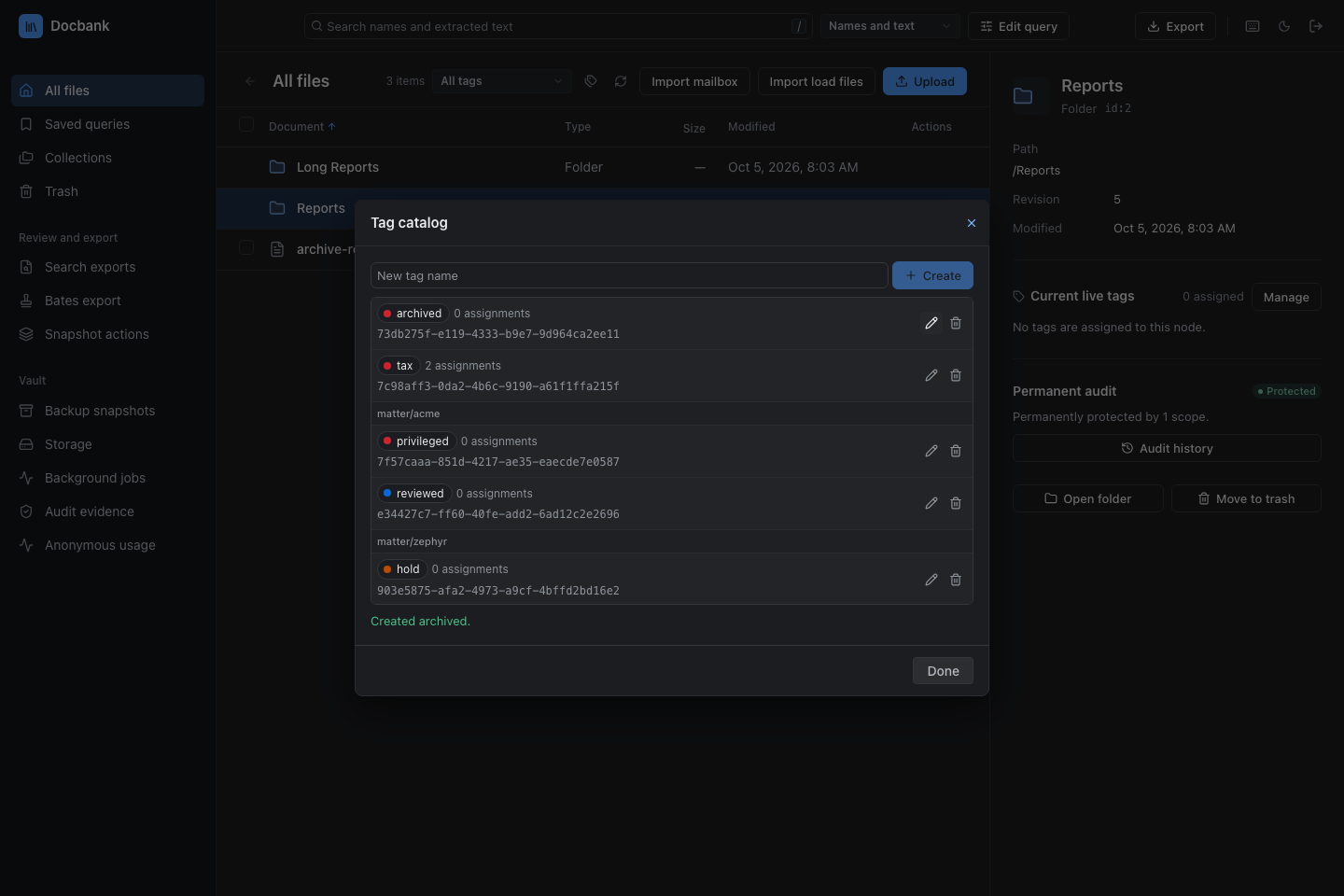
Tags organize documents independently of their current paths. Each tag has a stable UUID. Its name can change without breaking assignments or agent-held references.
In the web application, slash-separated names form display groups. For example,
matter/acme/reviewed appears as reviewed under matter/acme. The full name
is still one tag. Assigning it does not assign a parent tag. Use the full name
or UUID in CLI commands. Colors come from stable tag IDs, so renaming a tag
keeps its color. You do not need to configure groups or colors. See
web tag controls.
docbank tag create taxes
docbank tag assign taxes /taxes/2026/w2.pdf
docbank tag assign taxes /taxes/2026/return.pdf
docbank tag nodes taxes
docbank tag rename taxes "tax archive"
tag list shows definitions and assignment counts. tag show, tag rename,
tag delete, tag assign, tag unassign, and tag nodes accept either the
exact current name or the tag UUID. Assignment and definition changes bump the
tag revision and the revisions of affected nodes. Rename and delete apply only
if the tag revision still matches the one inspected, so a stale decision fails
instead of overwriting newer metadata. CLI assignment paths resolve in the same
transaction as the change, so an ancestor move cannot make the command tag a
node that has already left the requested path. Assigning an already assigned
tag or removing an absent assignment changes nothing.
A selector in canonical UUID form is always read as a tag ID. To address a tag whose display name looks like a UUID, use its generated ID.
Deleting a tag removes all of its assignments but never deletes a node or
document content. A tag recreated under the same name gets a new UUID. Trashed
nodes keep their tag assignments and appear as trashed in tag nodes.
Path-based assignment commands address live nodes only. When trash empty
permanently deletes tagged nodes, each affected tag revision advances before
those assignments are removed.
Tag a selected set atomically
In the web app, select document checkboxes and choose Edit tags. Pick one tag to see how many selected documents have it, then choose Add to all or Remove from all. Each operation accepts at most 1,000 selected documents. If any target is missing, trashed, or has changed since selection, the whole operation fails without changing assignments. Documents whose assignment is already correct keep their node revisions. Actual changes record the normal audit events.
If the response is lost, keep the dialog open and choose Retry same operation. The daemon returns the original receipt without applying the change twice. After a conflict, close the dialog and refresh the selection. Closing the dialog while the outcome is uncertain discards the browser's retry request. It does not undo a change the daemon already committed.
API clients use POST /api/v1/batch/tags with one tag ID, an operation UUID,
an assignment choice, and node/revision pairs. Docbank keeps receipts
indefinitely, including after tag or node deletion. They survive backup and
restore when the backup checkpoint includes them. They contain identities and
revisions, not filenames or tag names. A replay confirms the original outcome,
not current membership. See the
batch tag contract.
Atomic bulk reorganization
Use mv batch when a reorganization must either happen completely or leave the
tree untouched. The command reads a JSON plan from a file, or from standard
input with -:
{
  "moves": [
    {"source": "/inbox/final.pdf", "destination": "/filed/draft.pdf"},
    {"source": "id:42", "destination": "/inbox/final.pdf"}
  ]
}
Docbank resolves every source against the tree at the start of the transaction.
Each batch destination is the exact final path. An existing directory is not
shorthand for “move into this directory.” Destination parents are resolved in
the planned final tree, so one item can move beneath a directory that another
item moves in the same batch. To move a document into /filed and keep the
name a.pdf, give /filed/a.pdf as the destination. This makes file and
directory swaps unambiguous.
Before changing any entry, Docbank checks the complete proposed tree for missing parents, duplicate names within a folder, and cycles. If any selector, revision, or final path is invalid, nothing moves.
A path source means “the node at this coordinate when the transaction runs.” An
id:N source means “this exact node.” The CLI resolves it before submission
and binds the plan to its current revision. Receipts preserve plan order and
return each node's stable ID, prior path, final path, and resulting revision.
Plans accept at most 1,000 moves so validation and responses remain bounded.
Repeated docbank mv commands are independent transactions. Use mv batch
when partial completion is not acceptable.
Next: find what you filed with Searching, or manage deletion and recovery with Trash, garbage collection, repack, and verify.