Search exports
Export search counts for a date range from all live documents, selected import collections, or document versions selected in the workspace. Each export freezes the current document versions, search matches, family relationships, date evidence, and processing profile. Later vault changes do not change that export.
The CSV contains counts. The evidence ZIP contains the calculation inputs and date evidence needed to check those counts offline. To export original files or complete retained text, use document export bundles.
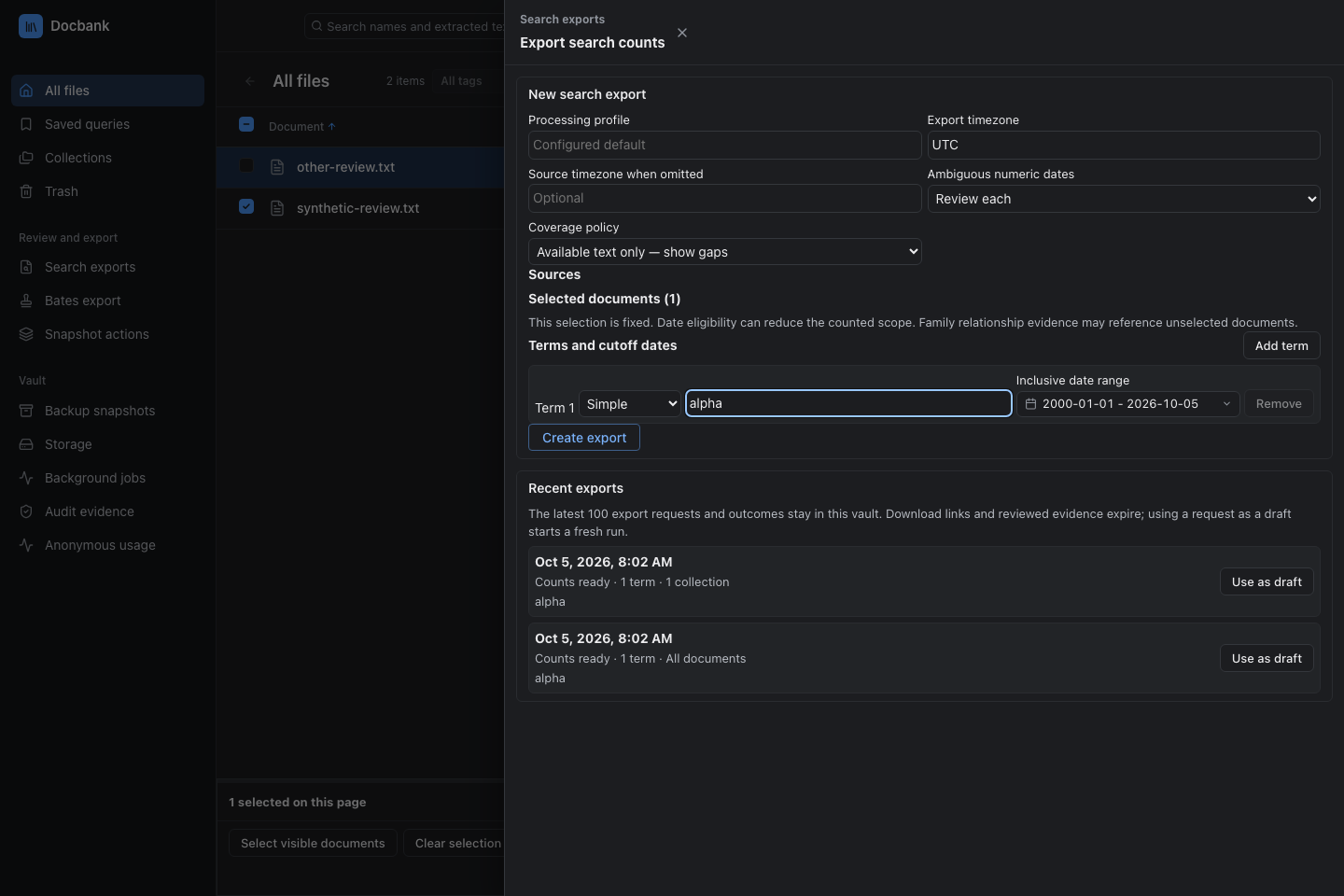
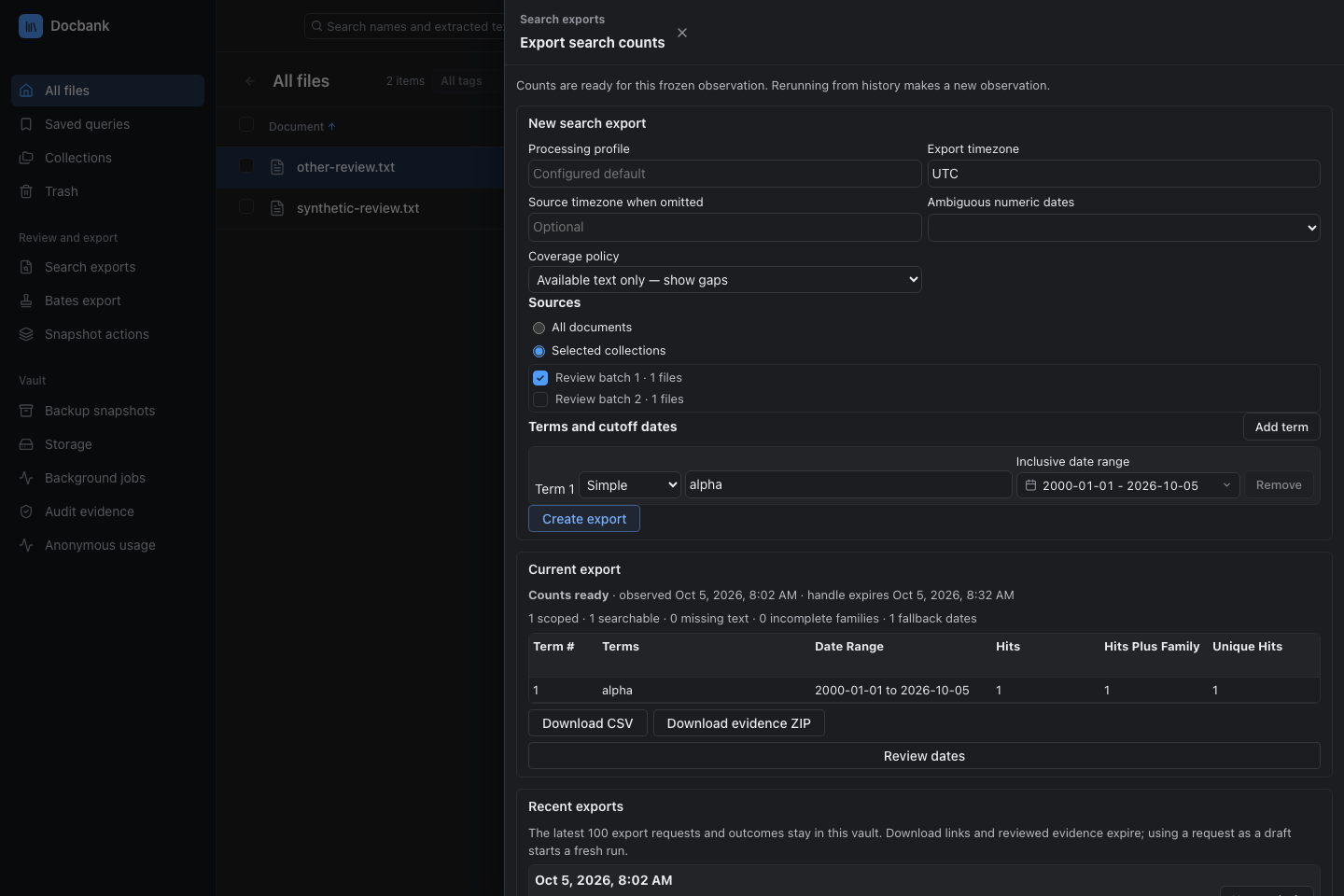
Create an export in the browser
- Open Search exports in the sidebar, or select documents on the displayed workspace or query-result page and choose Report selected documents.
- From the sidebar, choose all documents or import collections. A workspace selection opens a fixed Selected documents (N) scope. It uses only those displayed versions, without adding other query matches or attachments. Select a processing profile when more than one is configured. Exporting uses existing text and does not start document processing.
- Add search expressions and an inclusive start and end date for each row. Choose Simple or Advanced query syntax.
- Choose the export timezone and coverage policy, then Create export.
- If dates need review, select Review dates, inspect the evidence, and give a reason for each choice. An interpreted date needs a date and source timezone. Select Create reviewed revision.
- Download
search-export.csvorsearch-export.zipwhen counts are ready.
Recent exports automatically keeps the latest 100 requests and compact outcomes in the vault. Use as draft copies the request without its old date choices. Selected-document drafts keep their version identities, even if the workspace refreshes. A new run checks those versions again. If any changed or disappeared, refresh the workspace and reselect the documents. A rename or move alone does not invalidate their content identity. This history has no naming or deletion controls. Use Saved queries and highlights to manage named search definitions.
Create an export from the CLI
Save this version 1 request as request.json:
{
  "version": 1,
  "all_documents": true,
  "timezone": "UTC",
  "coverage_mode": "strict",
  "terms": [
    {
      "number": 1,
      "expression": "agreement",
      "syntax": "simple",
      "dates": {"start": "2024-01-01", "end": "2026-12-31"}
    }
  ]
}
docbank search-export create --input request.json --output search-export.zip
docbank search-export verify search-export.zip
docbank search-export csv search-export.zip --output search-export.csv
create uses the daemon and prints coverage. If dates need review, it prints
an export ID and review instructions without writing the ZIP. Inspect the
frozen evidence and submit a JSON array of choices:
docbank search-export dates <export-id> --limit 50
docbank search-export revise <export-id> --choices choices.json --output reviewed.zip
Use --cursor with the returned next_cursor to continue reading dates.
create, revise, download, and csv refuse to replace an existing output
unless --overwrite is supplied. verify and csv work offline without a
vault. Both verify the packet before accepting its counts.
Inspect or recover an existing export
Use a known report ID to read its live summary or save its verified evidence ZIP:
docbank search-export show <report-id>
docbank search-export show <report-id> --json
docbank search-export download <report-id> --output recovered.zip
docbank search-export csv recovered.zip --output recovered.csv
show includes counts, coverage, and expiry. A report awaiting date review has
no counts or download yet. Use dates and revise to resolve its evidence.
download saves the existing ZIP without creating a report, using another slot,
or extending expiry. It supports relative paths and refuses an existing file
unless you supply --overwrite. It does not download CSV directly. Extract CSV
from the saved ZIP offline.
List recorded runs, including their original requests, through history:
docbank search-export history --offset 0 --limit 20
docbank search-export history --offset 0 --limit 20 --json
History is vault-wide, including browser-created reports. Its recorded state
does not promise that a report is still live or belongs to the CLI. show and
download require a live handle owned by the CLI's API key. They do not
recreate an expired or unavailable report from history. CLI and MCP share that
owner.
History keeps the latest 100 receipts. Offset ranges from 0 to 100. Limit
ranges from 1 to 50 and defaults to 20. JSON returns the stored {items, total}
page, including full request selections. A page may contain fewer items than
requested to stay within its byte limit. Continue at the current offset plus
the number of returned items, rather than adding the requested limit. Human
output prints the next offset when more receipts remain.
After create or revise receives a valid summary, later errors keep the new
report ID. Use show to inspect that result and download to retry delivery
while it remains live. If the handle is unavailable after expiry or restart,
create a new report. Retrying that handle cannot recover it. A revision error
names the child report.
If delivery did not finish cleanly, inspect the destination first. The verified file may already have been published before a sync or staging-cleanup error. Verify an existing ZIP before deciding to retry or overwrite it. A failed final status print after a successful save says the file was saved.
This recovery requires a known ID. If a create or revise reply was lost before the CLI received a valid summary, it cannot identify the result reliably. History can help an operator investigate, but it cannot prove which call created a receipt. Repeating create or revise may consume another slot.
Release a report after review
Once you no longer need a live report, free its slot:
Release discards that handle's packet and date-review evidence, including a report still awaiting review. History cannot reconstruct that evidence. Saved files, source documents, history receipts and already published child reports remain unchanged. A child keeps its original expiry. Shared evidence stays in memory while another report or in-flight operation uses it, so freeing a slot does not guarantee that all global build or memory capacity is available.
An active download returns 409 report_retained; retry deliberately after it
closes. Even download && release can need a retry because the server closes
its reader after sending the final bytes. The command does not retry for you.
After an uncertain reply, run search-export show <report-id>. A successful
read means the handle remains. 410 report_unavailable means no live handle
owned by this caller remains; it does not establish which call removed it.
503 report_unavailable means reporting itself is unavailable and says nothing
about release. Repeating release for an absent handle returns 410, not success.
If printing the result fails after a successful release, the error says the
report was released.
JSON success is {"report_id":"<report-id>","released":true}. Invalid IDs or
argument counts exit 2; release errors exit 1. Development builds using an older
daemon that lacks this endpoint need an explicit daemon restart.
Request and reviewed-date format
Version 1 is stored in export history and evidence packets. Required fields and optional controls are:
| Field | Meaning |
|---|---|
version |
Must be 1. |
all_documents, collection_ids, selected_documents |
Choose exactly one scope: all_documents: true, a nonempty collection ID list, or the selected-document object below. Use all_documents: false for either list scope. |
profile |
Configured processing profile name. Required when several profiles exist. Omission returns invalid_profile. A sole configured profile is selected automatically. |
timezone |
Required IANA timezone, such as UTC or America/New_York. Local is rejected. Cutoffs are literal calendar dates in this zone. |
source_timezone |
Optional source timezone for timestamps that omit one. |
numeric_date_order |
Optional MDY or DMY interpretation of ambiguous numeric dates. Omit to leave ambiguity unresolved. |
coverage_mode |
strict (default) rejects incomplete search or family coverage in the date ranges. available_only retains the gaps in coverage totals. |
terms |
1–128 rows. Each has a unique positive number, nonempty expression of at most 8,192 Unicode characters, syntax (simple or advanced), and dates.start / dates.end in YYYY-MM-DD form. |
date_choices |
Optional evidence-bound choices for captured documents. A reused history request omits these. |
For selected documents, copy each current file's node ID, version ID, and content hash from the workspace/API. Replace the example request's all-document scope with this synthetic selection:
{
  "all_documents": false,
  "selected_documents": {
    "documents": [{
      "node_id": 42,
      "version_id": "20000000-0000-4000-8000-000000000002",
      "sha256": "aaaaaaaaaaaaaaaaaaaaaaaaaaaaaaaaaaaaaaaaaaaaaaaaaaaaaaaaaaaaaaaa"
    }]
  }
}
The selection requires 1–50,000 distinct positive node IDs, canonical lowercase
UUIDv4 version IDs, and 64-character lowercase hexadecimal hashes. The whole
request must fit within 8 MiB. Historical versions and selected pages are not
supported. Omitted or null selected_documents means no selected scope. An
object with a missing, null, or empty documents list is invalid.
Malformed or mixed scope, repeated nodes, invalid identity values, and a wrong
hash for a current version return 422 invalid_report_request. A missing,
trashed, or replaced version returns 409 report_selection_changed, without
a conflicting-member list. Even a new version with identical bytes conflicts.
More than 50,000 selected identities returns 413 report_limit. The existing
50,000-collection limit returns 422. These application errors apply after HTTP
schema validation. Wrong JSON types or missing required fields use the API's
ordinary schema errors.
A choice identifies the document (node_id, version_id, sha256),
candidate_id, and evidence_sha256 returned by the date page. Copy those
values from that page. Do not invent replacement IDs or hashes. Include a
nonempty reason of at most 4,096 bytes and one action:
| Action | Additional fields |
|---|---|
select |
Select the source date as given. Omit all reviewed_* fields. |
interpret |
Supply reviewed_date and reviewed_timezone. Only ambiguous numeric dates and timestamps without a timezone can be interpreted. The date must agree with the source tokens. An unclassified candidate also needs reviewed_role. |
reclassify |
Supply reviewed_role without replacing the date or timezone. |
Allowed reviewed roles are document_date, created, authored, sent,
captured, signed, effective, and expiry. A revision keeps the original
observation and expiry and receives a new export ID. It also keeps its parent's
reviewed choices. Submit the documents whose choices you want to add or
replace.
Read the counts and coverage
Rows keep the request order. Counts refer to distinct current document identities, not text occurrences. The first three CSV columns are Term #, Terms, and Date Range. The remaining columns mean:
| Column | Meaning |
|---|---|
| Hits | Documents that match this term and fall within its date range. |
| Hits Plus Family | Date-eligible documents in a family with a hit for this term. |
| Unique Hits | Hits for this term that are not hits for another row. |
| Unique Families | Date-eligible documents in matching families with no competing row hits among those eligible members. The web app labels this count Documents in unique families. The CSV keeps the heading Unique Families. |
| Unique Hits Plus Family | Date-eligible documents in a family containing a unique hit for this term. |
Families come from stored email parent/child evidence. A document without a family is a singleton. Family expansion stays within the selected source scope and each row's date range.
The ZIP includes relationship groups connected to selected documents, including connected documents outside the selected scope when needed to preserve grouping. An unselected attachment can connect two selected parents. It appears as a relationship reference, without member rows, text bindings, or date evidence. The ZIP omits unrelated relationship groups and their warnings. Documents outside the selected scope do not contribute to counts.
A trashed attachment cannot connect a fresh report's family, and its published parent has incomplete family coverage. If the parent and attachment versions are still current, restoring the attachment from trash makes the link available to fresh reports again. Backup and restore preserve the published relationships and trash state; an already captured report keeps its original family evidence.
Date selection prefers source evidence appropriate to the document kind, then labeled document dates, then source metadata and recorded import or vault dates. Equally preferred conflicting dates require review. Signed, effective, and expiry dates are kept for review and are not automatically treated as creation dates. Coarse or unusable dates are not silently made precise.
Coverage reports scoped documents, searchable documents, missing text,
incomplete families, and fallback dates for each row and across the union of
the date ranges. Incomplete-family coverage counts selected, date-eligible
documents, not distinct family groups. available_only can omit documents
without a usable selected date from coverage while keeping them as packet
members. Selected documents (N) is the input population. scoped counts
only documents inside at least one term's date range with a usable date.
Missing evidence does not prove that a document has no relevant content. Keep
the coverage receipt with the CSV when sharing counts.
Evidence and retention limits
The ZIP format marker is search-export-v1. Its fixed entries are hits.csv,
manifest.json, members.jsonl, families.jsonl, and dates.jsonl. The
manifest binds sizes and SHA-256 digests. Verification also checks date
selections, hit bits, counts, and coverage against the evidence in the packet.
For selected scope, the packet members must equal the requested identities
exactly. Omitted, extra, duplicate, or substituted members fail verification.
The packet includes document identities and date quotes, so review it before
sharing it.
Successful offline verification means internally consistent, not source verified. A packet cannot establish that its source vault or source documents were authentic. It does not include complete source text or rerun searches against the original documents.
Live export handles and date pages expire 30 minutes after observation and are lost on daemon restart. Handles belong to the requesting API or browser session. Ending a browser session invalidates its handles. Download the ZIP before expiry. CLI and MCP share eight live report slots, and every revision takes another slot. All descendants expire 30 minutes after the original observation. Downloading does not free a slot. CLI and MCP can explicitly release unneeded handles; browser sessions cannot release them.
History receipts survive backup and restore, but neither history nor a backup of history restores live artifacts or date-review pages. Source replacement, trash, or pruning does not invalidate an already captured report or extend its lifetime. History remains readable after source deletion and restore. Rerunning a saved selection requires its versions to be live and current again.
After restoring a vault, configure the same portable processing profile before
rerunning its saved requests. The
backup excludes config.toml.
Preserve the restored target's storage settings when adding the profile. History
does not keep date choices, so a fresh report may need date review again.
Large selections enlarge stored history: 100 requests near the 8 MiB ceiling can approach 800 MiB of request JSON, also carried by metadata export. History pages stop at 16 MiB. Automation must advance its offset by the returned item count, which can be smaller than the requested limit.
Each build has a 60-second deadline and shares a 1 GiB accounted memory budget with other cached exports. Limits include 50,000 documents, 100,000 family relations, 256 date candidates per document, 16 MiB of inspected text per document, 512 MiB of inspected text overall, and a 512 MiB ZIP. Exceeding the date-candidate limit returns a resource-limit error naming the document. It does not silently truncate the evidence. Narrow the source scope when a vault exceeds a build limit. At most two builds run concurrently, with 64 cached or pending exports overall and eight per owner.
Downloads of completed CSV and ZIP files are exempt from the server's 60-second request timeout. Client cancellation still stops the transfer.
Local MCP clients can select current documents, review frozen dates, and save
the same verified ZIP with docbank mcp --allow-report-writes. See the
MCP report workflow for discovery, message limits,
and shared handle capacity. Date pages return a continuation when the next
complete evidence item cannot fit. Quotes are never truncated. HTTP clients
can request smaller pages with max_bytes.
See the HTTP contract for endpoints, authentication, paging, and errors.